Your child's digital health record: infections, vaccinations and growth charts in one place
Published: 30 July 2026 · Updated: 3 October 2026 · Zdrovio team · editor: Łukasz Koralewski
Why is a parent's memory not enough?
A child's health history has three features nothing else has, and a parent's memory alone cannot carry them:
- There are many caregivers: mum, dad, grandma, kindergarten. Each knows a different piece of last week's fever.
- The child cannot speak for themselves: you are their memory at the doctor's.
- The history grows for years: whether an antibiotic worked two years ago can matter today.
A paper health booklet cannot carry that either. It is great for early vaccinations, but it will not record the course of an infection, home measurements or reports from specialists.
How do I keep track of my child's infections and medications?
Keep a timeline of every infection: what happened, when, and what helped. The most valuable record in a child's file is not a single result but the course: when the infection was, what the symptoms were, what the child received and how they reacted.
Start simply. For every infection note:
- the date,
- the symptoms,
- the medications (with doses!),
- one observation, for example "rash after amoxicillin, to clarify".
After a year of such notes the conversation at the paediatrician changes. Instead of "she is often ill" you say "the sixth ear infection since September, and last time that antibiotic did not work". Write down allergies and drug reactions immediately: every clinician needs that information in the first minute.
How should I store my child's medical documents?
Photograph every new document the day it arrives and describe it with a date and one sentence. The rule is the same as for any archive, and a child's paperwork grows faster than an adult's: test results, emergency room notes, reports from psychological services, certificates for school.
Do not scan everything since birth. Documents from the last year plus anything chronic (allergy, asthma, specialist reports) are enough. If you also look after an ageing parent, the same rule works for their papers, as our guide to a senior parent's medical documents shows step by step.
How do I record my child's height and weight?
Write down every measurement from check-ups and visits straight away, with the date. A single measurement says little; what matters is how the measurements change over time on the chart, and the more points you have, the better you can see it. The assessment belongs to the paediatrician.
One important rule: a growth chart is a tool for a conversation with the paediatrician, not for self-diagnosis. If something on the chart worries you, write the question down and bring it to the visit instead of searching the internet at midnight.
What should I bring to a paediatrician appointment?
One page that shows the whole picture. Before a visit, prepare it with:
- current medications and supplements with doses,
- the course of the current issue: since when the fever, how it developed, what you gave,
- recent measurements,
- two or three questions.
The paediatrician sees the whole picture in seconds, and you do not remember the most important question only on the way home.
Can I get a copy of my child's medical records?
Yes. If part of the history stayed at a clinic or hospital, you can request a copy of your child's medical records, and facilities are obliged to provide them. In Poland this follows from the Patient Rights Act (art. 23 and 27).
The first copy in the requested scope is free of charge (art. 28).
The national patient portal (IKP) will show you prescriptions and system entries, but it will not replace a home file: your own measurements, infection timelines and specialist reports have no home there. In short:
| Where | What it holds |
|---|---|
| National patient portal (IKP) | prescriptions and system entries |
| Paper health booklet | vaccinations, especially the early ones |
| Home file (a notebook or Zdrovio) | the everyday history: infections, measurements, observations, reports, questions |
How Zdrovio helps with all of this
You can run this system in a notebook, and it will work. Zdrovio does the same thing faster, and for children it adds things paper simply cannot do. Real screens from the app below.

1. Create the child's file: the "My child's" tile leads the way
You open app.zdrovio.app and set a password. The data stays on your phone, and with a child's data that is not a detail, it is the foundation. Then choose the "My child's" tile (pediatrician, school, therapy) and type the name and date of birth. The app starts you off with a child conversation pack and suggests what to add: the goal, documents, recommendations and three questions.
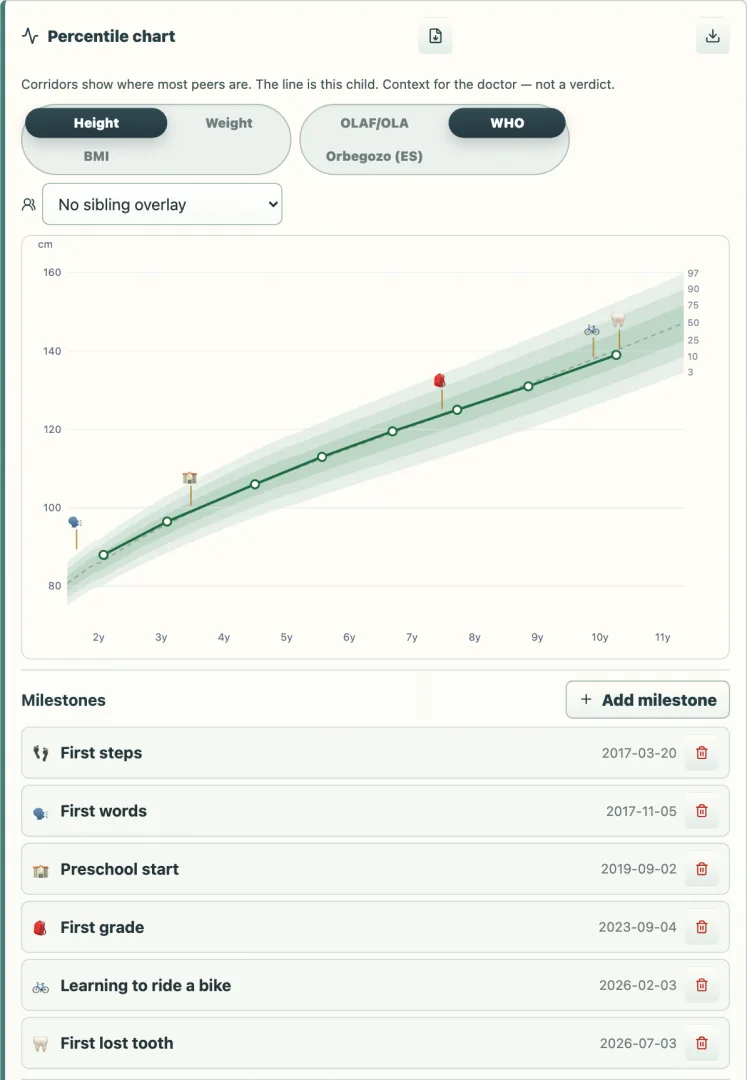
2. You enter measurements, Zdrovio draws the growth chart
Height and weight land on WHO and Polish OLAF/OLA growth charts, with all of the child's measurements, not a single dot. No paper booklet can do that. Zdrovio judges nothing: it shows how the measurements change over time on the chart and helps you write down a question for the paediatrician if something needs discussing.
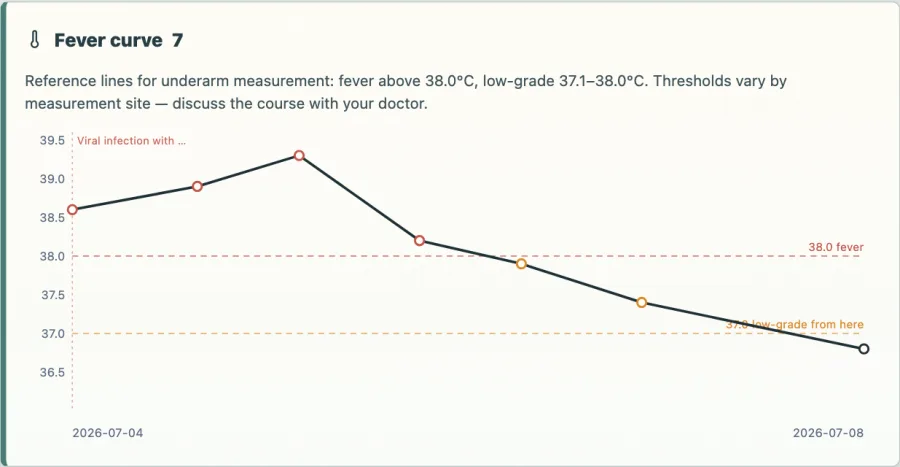
3. During an infection you log temperatures and a fever curve appears
Instead of a note by the bed, you enter readings and Zdrovio draws the fever curve of the whole infection. At the visit you show the course with dates and times. That is exactly what the paediatrician asks about, and exactly what nobody remembers at three in the morning.

4. Before the paediatrician: the app builds one page
In the "Visit" tab you see a readiness ring. Zdrovio counts what you already have (medications, course, measurements, questions) and points out the gaps. Out of this it builds the Visit Pack: one page to print or show from your phone. At the top there is a short note for the doctor: the pack was prepared in Zdrovio so that no visit time goes on writing down the history, and Zdrovio does not diagnose anything.
See an example Visit Pack for a paediatric visit; the data in it is invented for the example.
Where to get Zdrovio
Zdrovio runs on your phone (and computer) in the browser, so you do not need to install anything from an app store. You can start right away, without creating an account. First you can look at an example family folder without saving anything.
You start with 30 days of the full version with AI support for free. After that your folders stay available to view, print and export, and Zdrovio Full (a one-time purchase, no subscription) brings back editing, reminders and AI. Details at zdrovio.app. Questions? Write to pomoc@zdrovio.app.
See how Zdrovio helps families
New: Zdrovio is now on Google Play.
Frequently asked questions about a child's health record
Is my child's health data safe in Zdrovio?
Zdrovio has no account. Everything stays in your phone's memory, encrypted with your password. Nothing leaves your phone without your consent; the AI assistant only receives what you choose to send. You can delete it all at any time.
Do I have to fill in everything?
No. The medication and allergy list alone is most of the value at a visit. The rest you add as you go: a document photo takes 10 seconds, a measurement 20.
Why keep a home file if there is a patient portal and a paper booklet?
The portal shows prescriptions and system entries and the booklet holds vaccinations, but the child's everyday history (infections, measurements, observations, reports, questions) has no home there. Zdrovio is that home, and one you can print everything from.
How do I start a child's health record?
Start with the medication and allergy list, because it is most of the value at a visit. Then photograph every new document the day it arrives, write down measurements from check-ups and visits with the date and, before a visit, prepare one page for the paediatrician.
Do I need to create an account or install an app?
No. Zdrovio runs in the browser on your phone or computer, so you do not need to install anything from an app store, and you can start right away, without creating an account. Zdrovio is also on Google Play.
Can I see an example before entering my child's data?
Yes. You can first look at an example family folder without saving anything.
This article describes how to organize documents and observations. It is not medical advice. Interpreting growth charts, symptoms and results always belongs to the clinician. In an emergency in Poland call 112 or 999. Caring for an ageing parent too? Read the guide on a senior's medical documents. Wersja polska: elektroniczna książeczka zdrowia dziecka.